ge
);
// 409 is when there was a conflict, so we return the cart so the client can resolve it.
if ( 409 === $http_status_code ) {
return $this->add_data_to_error_object( $error_from_message, $additional_data, $http_status_code, true );
}
return $this->add_data_to_error_object( $error_from_message, $additional_data, $http_status_code );
}
/**
* Get route response when something went wrong.
*
* @param \WP_Error $error_object User facing error message.
* @param int $http_status_code HTTP status. Defaults to 500.
* @param array $additional_data Extra data (key value pairs) to expose in the error response.
* @return \WP_Error WP Error object.
*/
protected function get_route_error_response_from_object( $error_object, $http_status_code = 500, $additional_data = [] ) {
// 409 is when there was a conflict, so we return the cart so the client can resolve it.
if ( 409 === $http_status_code ) {
return $this->add_data_to_error_object( $error_object, $additional_data, $http_status_code, true );
}
return $this->add_data_to_error_object( $error_object, $additional_data, $http_status_code );
}
/**
* Adds additional data to the \WP_Error object.
*
* @param \WP_Error $error The error object to add the cart to.
* @param array $data The data to add to the error object.
* @param int $http_status_code The HTTP status code this error should return.
* @param bool $include_cart Whether the cart should be included in the error data.
* @returns \WP_Error The \WP_Error with the cart added.
*/
private function add_data_to_error_object( $error, $data, $http_status_code, bool $include_cart = false ) {
$data = array_merge( $data, [ 'status' => $http_status_code ] );
if ( $include_cart ) {
$data = array_merge( $data, [ 'cart' => wc()->api->get_endpoint_data( '/wc/store/v1/cart' ) ] );
}
$error->add_data( $data );
return $error;
}
/**
* Create or update a draft order based on the cart.
*
* @param \WP_REST_Request $request Full details about the request.
* @throws RouteException On error.
*/
private function create_or_update_draft_order( \WP_REST_Request $request ) {
$this->order = $this->get_draft_order();
if ( ! $this->order ) {
$this->order = $this->order_controller->create_order_from_cart();
} else {
$this->order_controller->update_order_from_cart( $this->order, true );
}
wc_do_deprecated_action(
'__experimental_woocommerce_blocks_checkout_update_order_meta',
array(
$this->order,
),
'6.3.0',
'woocommerce_store_api_checkout_update_order_meta',
'This action was deprecated in WooCommerce Blocks version 6.3.0. Please use woocommerce_store_api_checkout_update_order_meta instead.'
);
wc_do_deprecated_action(
'woocommerce_blocks_checkout_update_order_meta',
array(
$this->order,
),
'7.2.0',
'woocommerce_store_api_checkout_update_order_meta',
'This action was deprecated in WooCommerce Blocks version 7.2.0. Please use woocommerce_store_api_checkout_update_order_meta instead.'
);
/**
* Fires when the Checkout Block/Store API updates an order's meta data.
*
* This hook gives extensions the chance to add or update meta data on the $order.
* Throwing an exception from a callback attached to this action will make the Checkout Block render in a warning state, effectively preventing checkout.
*
* This is similar to existing core hook woocommerce_checkout_update_order_meta.
* We're using a new action:
* - To keep the interface focused (only pass $order, not passing request data).
* - This also explicitly indicates these orders are from checkout block/StoreAPI.
*
* @since 7.2.0
*
* @see https://github.com/woocommerce/woocommerce-gutenberg-products-block/pull/3686
*
* @param \WC_Order $order Order object.
*/
do_action( 'woocommerce_store_api_checkout_update_order_meta', $this->order );
// Confirm order is valid before proceeding further.
if ( ! $this->order instanceof \WC_Order ) {
throw new RouteException(
'woocommerce_rest_checkout_missing_order',
__( 'Unable to create order', 'woocommerce' ),
500
);
}
// Store order ID to session.
$this->set_draft_order_id( $this->order->get_id() );
/**
* Try to reserve stock for the order.
*
* If creating a draft order on checkout entry, set the timeout to 10 mins.
* If POSTing to the checkout (attempting to pay), set the timeout to 60 mins (using the woocommerce_hold_stock_minutes option).
*/
try {
$reserve_stock = new ReserveStock();
$duration = $request->get_method() === 'POST' ? (int) get_option( 'woocommerce_hold_stock_minutes', 60 ) : 10;
$reserve_stock->reserve_stock_for_order( $this->order, $duration );
} catch ( ReserveStockException $e ) {
throw new RouteException(
$e->getErrorCode(),
$e->getMessage(),
$e->getCode()
);
}
}
/**
* Updates the current customer session using data from the request (e.g. address data).
*
* Address session data is synced to the order itself later on by OrderController::update_order_from_cart()
*
* @param \WP_REST_Request $request Full details about the request.
*/
private function update_customer_from_request( \WP_REST_Request $request ) {
$customer = wc()->customer;
// Billing address is a required field.
foreach ( $request['billing_address'] as $key => $value ) {
$callback = "set_billing_$key";
if ( is_callable( [ $customer, $callback ] ) ) {
$customer->$callback( $value );
} elseif ( $this->additional_fields_controller->is_field( $key ) ) {
$this->additional_fields_controller->persist_field_for_customer( "/billing/$key", $value, $customer );
}
}
// If shipping address (optional field) was not provided, set it to the given billing address (required field).
$shipping_address_values = $request['shipping_address'] ?? $request['billing_address'];
foreach ( $shipping_address_values as $key => $value ) {
$callback = "set_shipping_$key";
if ( is_callable( [ $customer, $callback ] ) ) {
$customer->$callback( $value );
} elseif ( $this->additional_fields_controller->is_field( $key ) ) {
$this->additional_fields_controller->persist_field_for_customer( "/shipping/$key", $value, $customer );
}
}
// Persist contact fields to session.
$contact_fields = $this->additional_fields_controller->get_contact_fields_keys();
if ( ! empty( $contact_fields ) ) {
foreach ( $contact_fields as $key ) {
if ( isset( $request['additional_fields'], $request['additional_fields'][ $key ] ) ) {
$this->additional_fields_controller->persist_field_for_customer( $key, $request['additional_fields'][ $key ], $customer );
}
}
}
/**
* Fires when the Checkout Block/Store API updates a customer from the API request data.
*
* @since 8.2.0
*
* @param \WC_Customer $customer Customer object.
* @param \WP_REST_Request $request Full details about the request.
*/
do_action( 'woocommerce_store_api_checkout_update_customer_from_request', $customer, $request );
$customer->save();
}
/**
* Gets the chosen payment method from the request.
*
* @throws RouteException On error.
* @param \WP_REST_Request $request Request object.
* @return \WC_Payment_Gateway|null
*/
private function get_request_payment_method( \WP_REST_Request $request ) {
$available_gateways = WC()->payment_gateways->get_available_payment_gateways();
$request_payment_method = wc_clean( wp_unslash( $request['payment_method'] ?? '' ) );
$requires_payment_method = $this->order->needs_payment();
if ( empty( $request_payment_method ) ) {
if ( $requires_payment_method ) {
throw new RouteException(
'woocommerce_rest_checkout_missing_payment_method',
__( 'No payment method provided.', 'woocommerce' ),
400
);
}
return null;
}
if ( ! isset( $available_gateways[ $request_payment_method ] ) ) {
$all_payment_gateways = WC()->payment_gateways->payment_gateways();
$gateway_title = isset( $all_payment_gateways[ $request_payment_method ] ) ? $all_payment_gateways[ $request_payment_method ]->get_title() : $request_payment_method;
throw new RouteException(
'woocommerce_rest_checkout_payment_method_disabled',
sprintf(
// Translators: %s Payment method ID.
__( '%s is not available for this order—please choose a different payment method', 'woocommerce' ),
esc_html( $gateway_title )
),
400
);
}
return $available_gateways[ $request_payment_method ];
}
/**
* Order processing relating to customer account.
*
* Creates a customer account as needed (based on request & store settings) and updates the order with the new customer ID.
* Updates the order with user details (e.g. address).
*
* @throws RouteException API error object with error details.
* @param \WP_REST_Request $request Request object.
*/
private function process_customer( \WP_REST_Request $request ) {
try {
if ( $this->should_create_customer_account( $request ) ) {
$customer_id = $this->create_customer_account(
$request['billing_address']['email'],
$request['billing_address']['first_name'],
$request['billing_address']['last_name']
);
// Associate customer with the order. This is done before login to ensure the order is associated with
// the correct customer if login fails.
$this->order->set_customer_id( $customer_id );
$this->order->save();
// Log the customer in to WordPress. Doing this inline instead of using `wc_set_customer_auth_cookie`
// because wc_set_customer_auth_cookie forces the use of session cookie.
wp_set_current_user( $customer_id );
wp_set_auth_cookie( $customer_id, true );
// Init session cookie if the session cookie handler exists.
if ( is_callable( [ WC()->session, 'init_session_cookie' ] ) ) {
WC()->session->init_session_cookie();
}
}
} catch ( \Exception $error ) {
switch ( $error->getMessage() ) {
case 'registration-error-invalid-email':
throw new RouteException(
'registration-error-invalid-email',
__( 'Please provide a valid email address.', 'woocommerce' ),
400
);
case 'registration-error-email-exists':
throw new RouteException(
'registration-error-email-exists',
__( 'An account is already registered with your email address. Please log in before proceeding.', 'woocommerce' ),
400
);
}
}
// Persist customer address data to account.
$this->order_controller->sync_customer_data_with_order( $this->order );
}
/**
* Check request options and store (shop) config to determine if a user account should be created as part of order
* processing.
*
* @param \WP_REST_Request $request The current request object being handled.
* @return boolean True if a new user account should be created.
*/
private function should_create_customer_account( \WP_REST_Request $request ) {
if ( is_user_logged_in() ) {
return false;
}
// Return false if registration is not enabled for the store.
if ( false === filter_var( wc()->checkout()->is_registration_enabled(), FILTER_VALIDATE_BOOLEAN ) ) {
return false;
}
// Return true if the store requires an account for all purchases. Note - checkbox is not displayed to shopper in this case.
if ( true === filter_var( wc()->checkout()->is_registration_required(), FILTER_VALIDATE_BOOLEAN ) ) {
return true;
}
// Create an account if requested via the endpoint.
if ( true === filter_var( $request['create_account'], FILTER_VALIDATE_BOOLEAN ) ) {
// User has requested an account as part of checkout processing.
return true;
}
return false;
}
/**
* Create a new account for a customer.
*
* The account is created with a generated username. The customer is sent
* an email notifying them about the account and containing a link to set
* their (initial) password.
*
* Intended as a replacement for wc_create_new_customer in WC core.
*
* @throws \Exception If an error is encountered when creating the user account.
*
* @param string $user_email The email address to use for the new account.
* @param string $first_name The first name to use for the new account.
* @param string $last_name The last name to use for the new account.
*
* @return int User id if successful
*/
private function create_customer_account( $user_email, $first_name, $last_name ) {
if ( empty( $user_email ) || ! is_email( $user_email ) ) {
throw new \Exception( 'registration-error-invalid-email' );
}
if ( email_exists( $user_email ) ) {
throw new \Exception( 'registration-error-email-exists' );
}
$username = wc_create_new_customer_username( $user_email );
// Handle password creation.
$password = wp_generate_password();
$password_generated = true;
// Use WP_Error to handle registration errors.
$errors = new \WP_Error();
/**
* Fires before a customer account is registered.
*
* This hook fires before customer accounts are created and passes the form data (username, email) and an array
* of errors.
*
* This could be used to add extra validation logic and append errors to the array.
*
* @since 7.2.0
*
* @internal Matches filter name in WooCommerce core.
*
* @param string $username Customer username.
* @param string $user_email Customer email address.
* @param \WP_Error $errors Error object.
*/
do_action( 'woocommerce_register_post', $username, $user_email, $errors );
/**
* Filters registration errors before a customer account is registered.
*
* This hook filters registration errors. This can be used to manipulate the array of errors before
* they are displayed.
*
* @since 7.2.0
*
* @internal Matches filter name in WooCommerce core.
*
* @param \WP_Error $errors Error object.
* @param string $username Customer username.
* @param string $user_email Customer email address.
* @return \WP_Error
*/
$errors = apply_filters( 'woocommerce_registration_errors', $errors, $username, $user_email );
if ( is_wp_error( $errors ) && $errors->get_error_code() ) {
throw new \Exception( $errors->get_error_code() );
}
/**
* Filters customer data before a customer account is registered.
*
* This hook filters customer data. It allows user data to be changed, for example, username, password, email,
* first name, last name, and role.
*
* @since 7.2.0
*
* @param array $customer_data An array of customer (user) data.
* @return array
*/
$new_customer_data = apply_filters(
'woocommerce_new_customer_data',
array(
'user_login' => $username,
'user_pass' => $password,
'user_email' => $user_email,
'first_name' => $first_name,
'last_name' => $last_name,
'role' => 'customer',
'source' => 'store-api',
)
);
$customer_id = wp_insert_user( $new_customer_data );
if ( is_wp_error( $customer_id ) ) {
throw $this->map_create_account_error( $customer_id );
}
// Set account flag to remind customer to update generated password.
update_user_option( $customer_id, 'default_password_nag', true, true );
/**
* Fires after a customer account has been registered.
*
* This hook fires after customer accounts are created and passes the customer data.
*
* @since 7.2.0
*
* @internal Matches filter name in WooCommerce core.
*
* @param integer $customer_id New customer (user) ID.
* @param array $new_customer_data Array of customer (user) data.
* @param string $password_generated The generated password for the account.
*/
do_action( 'woocommerce_created_customer', $customer_id, $new_customer_data, $password_generated );
return $customer_id;
}
/**
* Convert an account creation error to an exception.
*
* @param \WP_Error $error An error object.
* @return \Exception.
*/
private function map_create_account_error( \WP_Error $error ) {
switch ( $error->get_error_code() ) {
// WordPress core error codes.
case 'empty_username':
case 'invalid_username':
case 'empty_email':
case 'invalid_email':
case 'email_exists':
case 'registerfail':
return new \Exception( 'woocommerce_rest_checkout_create_account_failure' );
}
return new \Exception( 'woocommerce_rest_checkout_create_account_failure' );
}
}
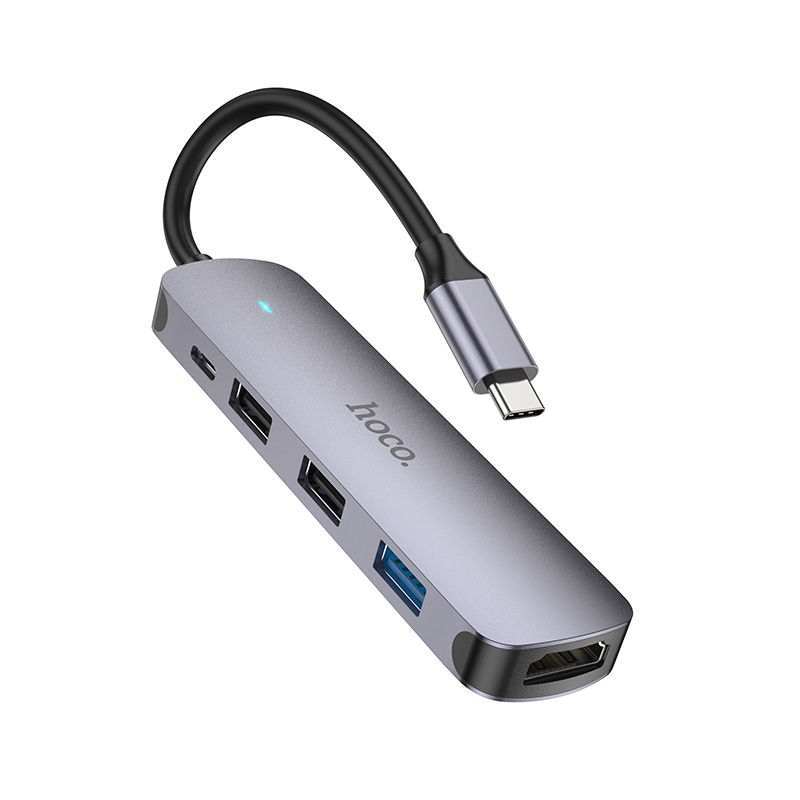
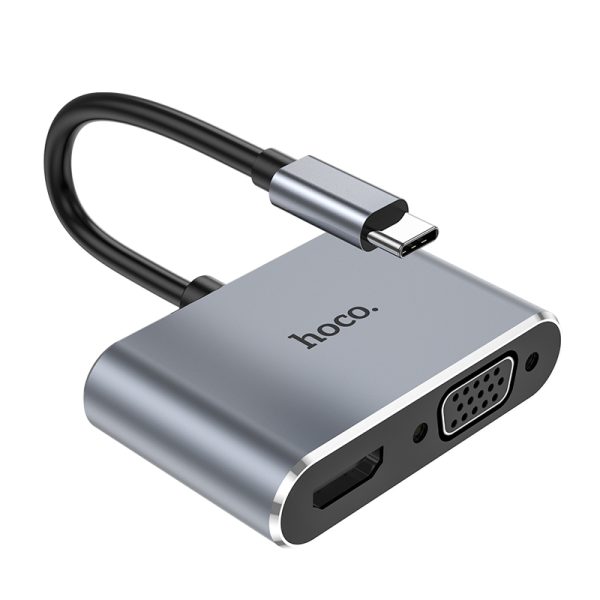
4. HDMI supports 4K 30Hz resolution, audio and video synchronization; VGA supports 1080P resolution, but does not support audio output; HDMI and VGA dual-port simultaneous output is 1080P resolution; USB3.0 theoretical transmission speed 5Gbps; Type-C supports PD 100W charging
5. Type-C notebook connected to projector/TV/monitor and other devices (compatible with most operating systems on the market such as windows and Mac OS)
4. HDMI supports 4K 30Hz resolution, audio and video synchronization; VGA supports 1080P resolution, but does not support audio output; HDMI and VGA dual-port simultaneous output is 1080P resolution; USB3.0 theoretical transmission speed 5Gbps; Type-C supports PD 100W charging
5. Type-C notebook connected to projector/TV/monitor and other devices (compatible with most operating systems on the market such as windows and Mac OS)
HOCO TECHNOLOGY has established the brand “hoco.” since its initial establishment in 2009. Through many years development, the brand “hoco.” has developed into a globally famous brand of digital and mobile phone spare parts.
Vestibulum curae torquent diam diam commodo parturient penatibus nunc dui adipiscing convallis bulum parturient suspendisse parturient a.Parturient in parturient scelerisque nibh lectus quam a natoque adipiscing a vestibulum hendrerit et pharetra fames nunc natoque dui.
ADIPISCING CONVALLIS BULUM
Vestibulum penatibus nunc dui adipiscing convallis bulum parturient suspendisse.
Abitur parturient praesent lectus quam a natoque adipiscing a vestibulum hendre.
Scelerisque adipiscing bibendum sem vestibulum et in a a a purus lectus faucibus lobortis tincidunt purus lectus nisl class eros.Condimentum a et ullamcorper dictumst mus et tristique elementum nam inceptos hac parturient scelerisque vestibulum amet elit ut volutpat.
Reviews
There are no reviews yet.